FREE ON THE APP STORE · iOS 17+

Tired of breaking
your own focus rules?
Give the key to a friend.

Cooked locks your apps with Apple Screen Time — only a trusted friend can let you back in. No passcode for you. No loopholes. No excuses.

Free to start·No subscription ever·Your friend needs zero installs
AMDKMR
312+ sessions locked by early testers
✕ Opal: tap "Ignore limit" — done✕ Forest: kill a pixel tree — done✓ Cooked: beg your friend out loud
iOS Screen Time · Active
Instagram BlockedTikTok BlockedYouTube BlockedZero Bypass Code
SEE COOKED IN ACTION

Built natively for iOS 17 Screen Time & Live Activity

No clunky VPN tunnels. No battery draining trackers. Native Apple Screen Time shields apps at the OS level while your Live Activity keeps you accountable.

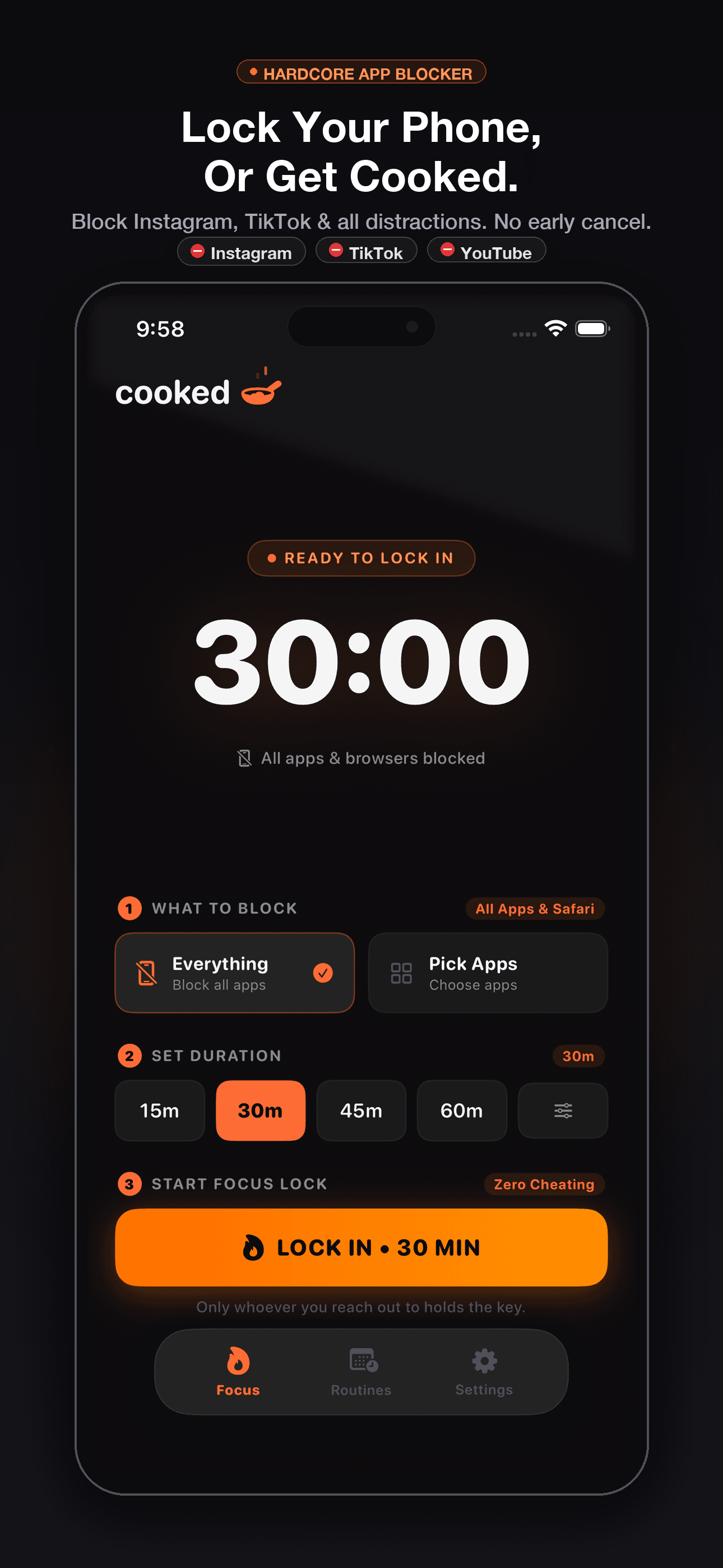
Cooked app screenshot: selecting focus duration and apps to lock

Hard App Lock

Shield social apps with uncheatable iOS Screen Time.

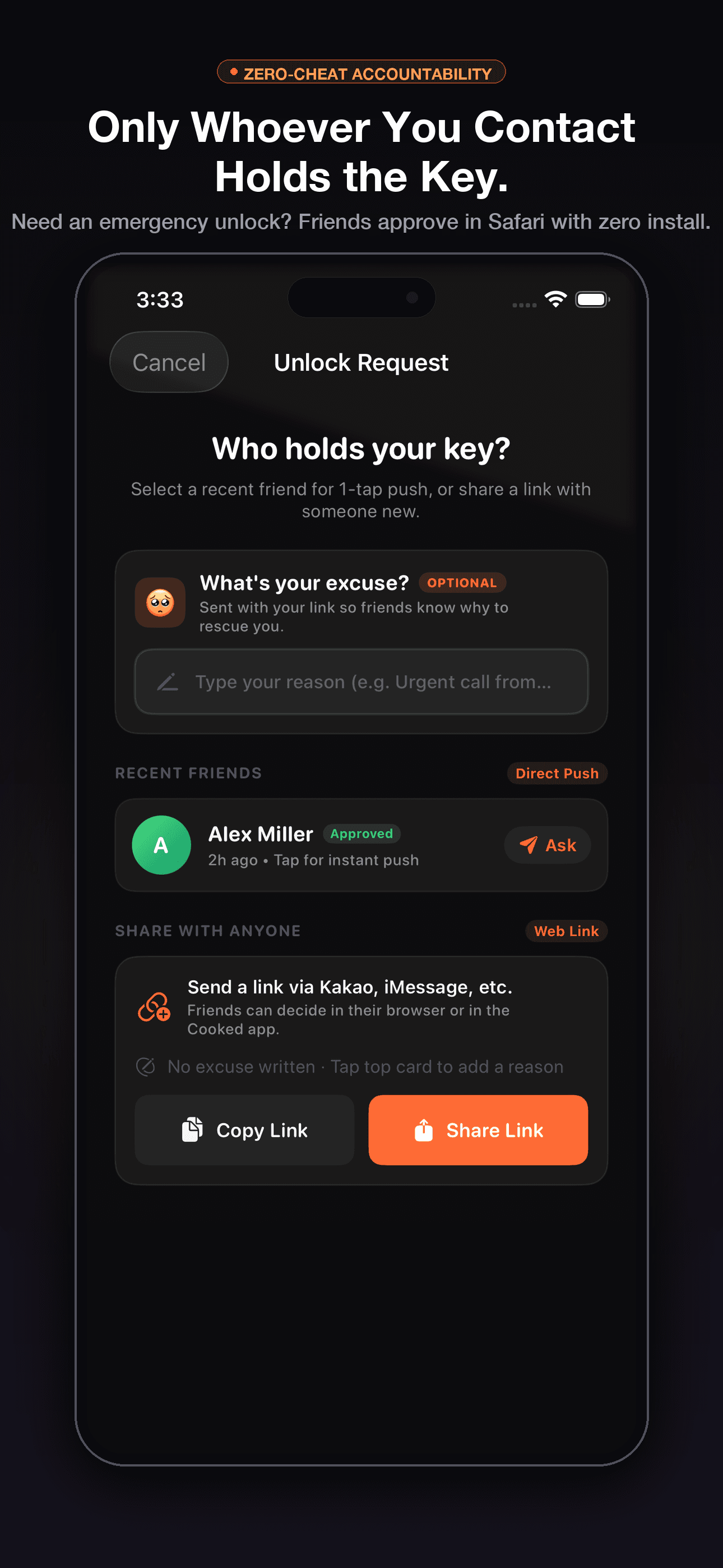
Cooked app screenshot: friend rescue link interface

Social Rescue

Friends decide in Safari with zero app install needed.

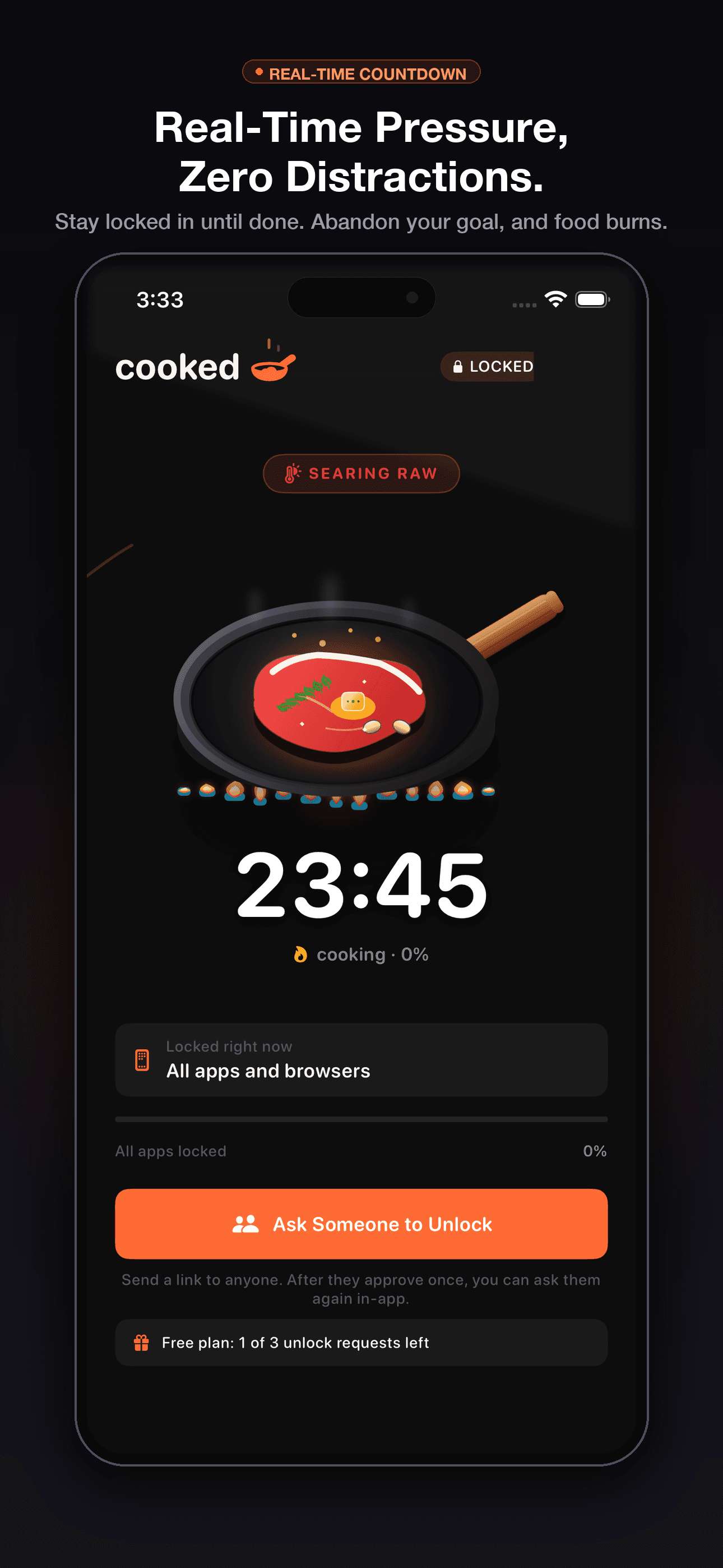
Cooked app screenshot: Live Activity and Dynamic Island lockdown timer

Live Activity

Real-time countdown directly on your Lock Screen.

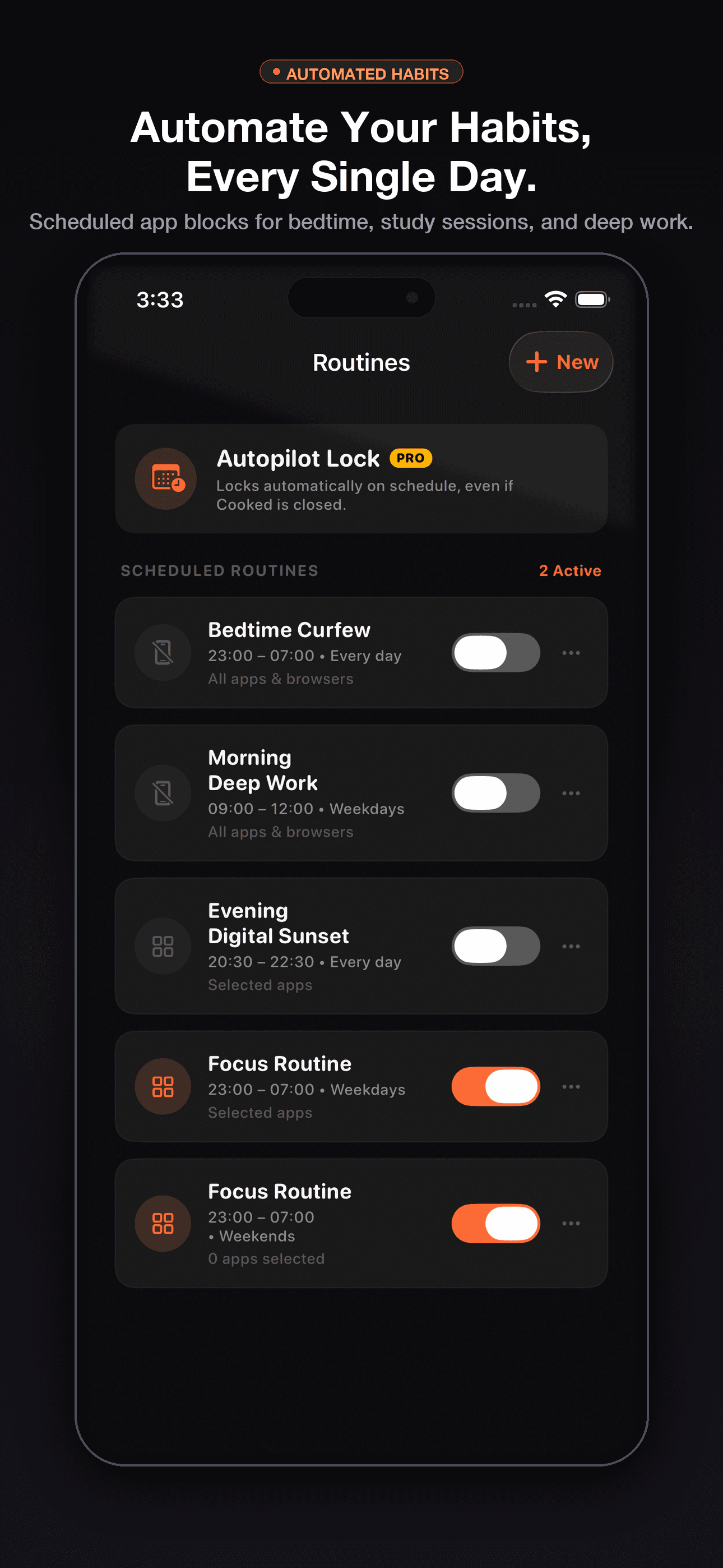
Cooked app screenshot: scheduled focus routines for weekday study blocks

Autopilot Routines

Automate study and work focus hours every weekday.

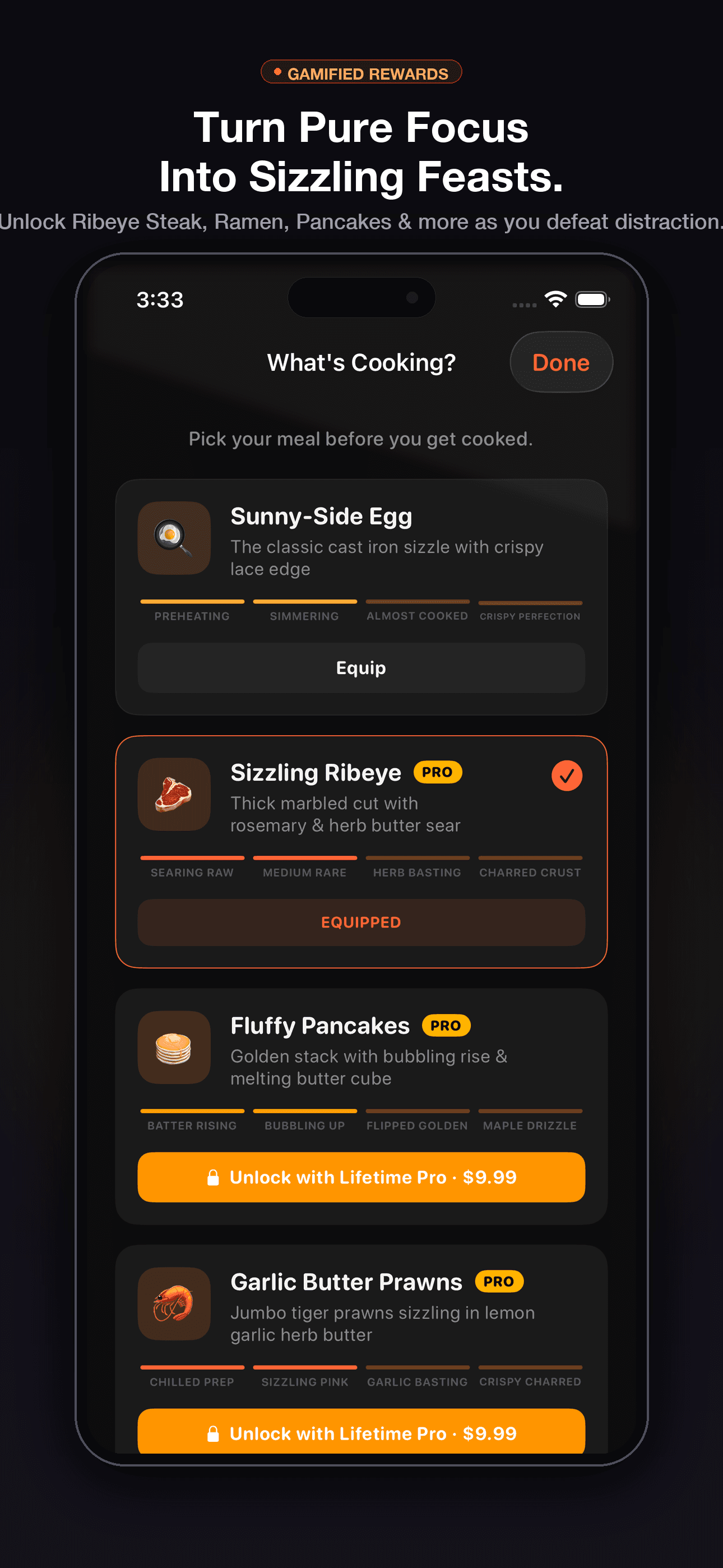
Cooked app screenshot: culinary rewards and skillet achievements

Culinary Rewards

Earn sizzling dishes as you conquer screen addiction.

Seen enough?

Stop breaking your own rules.
Download and hand the key to a friend.

Download Free on App Store

Free to start · No subscription · $4.99 Lifetime Pro upgrade available

🚀 ReleaseMarch 2025 · iOS 17.0+
 Apple NativeScreen Time & FamilyControls
Open Source Web Link
💬 CommunityFeatured on r/ScreenTime
HOW IT WORKS

How Cooked stops doomscrolling for good

Ordinary screen time gives you an escape button. Cooked eliminates the loophole by moving the key to someone else.

1

Lock Down Distractions

Select your dopamine traps (TikTok, Reels, Games). Native Apple Screen Time shields them at the core OS level. No VPNs, zero battery drain.

2

Surrender the Key

Pick a friend or roommate as your key holder. They need zero app installs — unlock requests open as an instant web link in Safari on any device.

3

Beg or Stay Cooked

Crave a scroll? Send a rescue request. If your friend rejects it, your phone stays sealed. No cheat code, no override.

4

Schedule on Autopilot

Lock your work and study hours every weekday automatically, with a live countdown right on your Lock Screen and Dynamic Island.

THE REALITY CHECK

Why other focus apps fail

Other Screen Time Apps
Cooked app iconCooked
✕"1 more minute" bypass
✓ Zero self-bypass
✕ You hold your own passcode
✓ Friend holds the key
✕ Friends must install 200MB app
✓ 0-install Safari link
✕ $3.49/week or $14.99 subscriptions
✓ Free to start, $4.99 Lifetime
TRANSPARENT PRICING

Free to start. $4.99 once. Forever.

The anti-subscription focus lock. No monthly fees, no renewals, no bill creep.

🔥 MOST POPULAR · ONE-TIME LIFETIME

Cooked Lifetime Pro

Less than two weeks of competitor weekly plans ($3.49/wk on PhoneLess, $14.99 on Lock In).

🏷️ Launch pricing: Save 85%+ vs $99/yr or $3.49/wk subscriptions
$4.99once
Pay once, own forever

Cooked Free

  • ✓ Unlimited manual focus lock sessions
  • ✓ Friend rescue via 0-install web links
  • ✓ Apple Screen Time on-device shield
  • ✓ Emergency unlock with safety delay

Lifetime Pro ($4.99 once)

  • ★ Everything in Free, plus:
  • ★ Autopilot scheduled weekday routines
  • ★ Live Activity & Dynamic Island countdown
  • ★ Custom skillet themes & soundscapes
  • ★ All future updates, zero recurring charges
Apple Family Sharing Supported

Processed securely via Apple App Store. No surprise bills.

Free tier never expires — upgrade only when Autopilot earns it. Zero risk.

Download Free on iOS→
WHY I BUILT COOKED

Willpower is a terrible security system.

Like so many students and knowledge workers, my biggest productivity obstacle wasn't a lack of ambition—it was the "Ignore limit for 15 minutes" button on Apple Screen Time.

I tried Opal, Forest, and pomodoro timers. Every single app gave me a loophole to negotiate with myself, and when fatigue hit at 3 PM or during study week, I took that loophole every single time.

I built Cooked because real discipline requires removing self-negotiation entirely. By handing the master key to a trusted friend—without forcing them to download any 200MB app—you make doomscrolling socially awkward. If you want to break focus, you have to swallow your pride and explain why.

No predatory weekly subscriptions, zero selling of personal data, and a one-time fair purchase.

HR

Haehun Ryu

Founder & iOS Developer, Cooked
EARLY USER EXPERIENCES

How people stay locked in with friends

Real study and work session outcomes from early iOS testers.

"Locked my TikTok and Instagram for a 3-hour midterm study session. Knowing my roommate would get the rescue ping kept me from even attempting to open them."

AM

Alex M. @alexm_studies

NYU Student • 3hr Block

✓ Verified

"The scheduled weekday routine changed my mornings. My apps lock automatically at 8:30 AM so I actually start work instead of doomscrolling in bed."

DK

David K. @davidk_dev

Software Engineer • Routine

✓ Verified

"My boyfriend didn't have to install anything. He just opened the Safari link on his phone, tapped Deny with 'Keep cooking', and saved me 45 minutes of wasted time."

MR

Maya R. @mayar_design

Designer • Deep Work

✓ Verified

*Early tester session feedback. Have a story? Share your experience with us at cookedfocus@gmail.com.

FAQ

Frequently Asked Questions

Does my friend have to install Cooked?

No! When you request an unlock, Cooked generates a secure web link. Your friend opens it in Safari or Chrome on any phone or laptop and taps Approve or Deny. Zero downloads required for them.

What data does Cooked see?

Cooked operates with zero access to your private browsing history, messages, or app contents. All app blocking happens entirely on-device using Apple's official FamilyControls and ManagedSettings framework. We never sell your personal data or track your activity.

How is this different from Screen Time or Forest?

With Apple Screen Time, Opal, or Forest, you can always tap "Ignore limit" or sacrifice a cartoon tree to keep scrolling. With Cooked, the master unlock key is physically held by another human being. When you want to unlock early, your friend opens an instant web link and decides whether your excuse is legitimate. You cannot bypass it alone.

Who is Cooked NOT for?

Cooked is not for you if you want a gentle reminder, a soft nudge, or a parental control spy app. Cooked is built for disciplined individuals who want to eliminate self-negotiation: your key holder is an actual person you trust, and they have the real power to say NO.

Can I bypass it by turning off Screen Time?

No. Cooked uses Apple's official Screen Time framework to lock selected apps at the system level. You cannot cheat your own session.

What if there is a real emergency?

Cooked includes an Emergency Unlock override with a deliberate safety delay countdown to ensure it is only used when genuinely necessary.

Is Cooked really a one-time purchase?

Yes. You can download and use Cooked for free with standard focus sessions. If you choose to upgrade to Cooked Pro for automated weekday schedules and custom themes, it is a single $4.99 one-time purchase. No monthly recurring charges, no yearly renewals.

Cooked app icon

Stop negotiating with yourself.

You lose every time. Hand the master key to someone you trust, download Cooked, and conquer doomscrolling today.

Cooked app icon
Cooked Focus★ Free · No Subscription
Download Free